
Text copied from PDF full of breaks: how to make it readable
Remove double spaces and unexpected breaks from text copied from PDFs and pages, without erasing the necessary structure.
You copy a paragraph from a report to respond to a message, but each line ends in the middle of a sentence. The text looks like a ladder of words. This problem happens because the selection can respect the visual layout of the page, not the logical paragraphs.
Identify which breaks are errors
A line broken just because it reached the shore can be joined to the next. The separation between title and paragraph, or between items in a list, must be preserved. InClear text, try adjustments on one copy before applying changes to the entire document.
It's also worth looking for duplicate spaces, tabs and invisible characters that get in the way of a collage. Very aggressive automatic cleanups can join two words together or remove the structure of addresses, poems, recipes, and code snippets.
Hyphens are a tricky detail
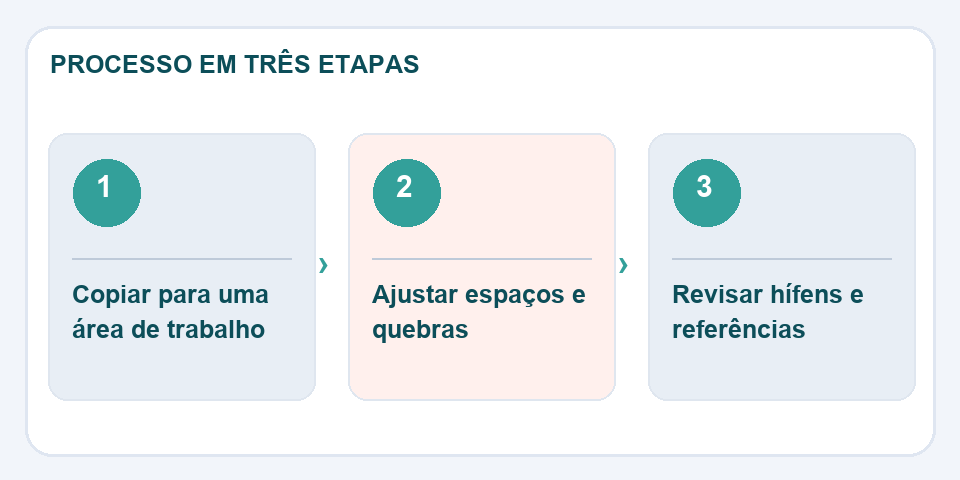
Some PDFs split a word at the end of the line with a hyphen. When joining the lines, it may be necessary to remove this sign. In other situations, the hyphen is part of the term and needs to stay, such as in proper nouns or compound expressions. Check case by case when text is important.
One last human reading still counts
Read the result quietly and see where the punctuation sounds strange. Compare excerpts that contain numbers, references and citations to the original material. If you use the text for publication, correctly attribute the source and check the usage rights. A clean text must remain faithful to the meaning it had before formatting.
A paragraph is not a visual line
Texts extracted from diagrammed documents often include artificial breaks in the middle of sentences. Putting them together improves the reading, but not every break should disappear. In bills of materials, addresses, and poems, line separation can carry meaning. If you remove everything indiscriminately, you turn an understandable structure into a confusing block.
Sample a snippet of each type before applying cleanup to the entire document. Also look for symbols that were copied as strange characters and spaces that don't respond like regular spaces. In the case of hyphenated terms, compare with the original to see if the hyphen belongs to the word or just to the division of the line. When the destination is a publication, review punctuation and paragraphs again after pasting.
Also read
- How to copy text from a photo without introducing errors into the document
- Compare texts: find discrete changes between two versions
- Word counter: how to meet limits without impoverishing the text
Technical reference: Markdown syntax and formatting (CommonMark).

Fabiano Freitas has a degree in Information Technology Management and writes about technology applied to everyday life, digital tools and productivity. At FileBito, it publishes practical guidance on PDF, images, data and conversions, with attention to privacy, file quality and checking results.